vllm-project/vllm
Getting started
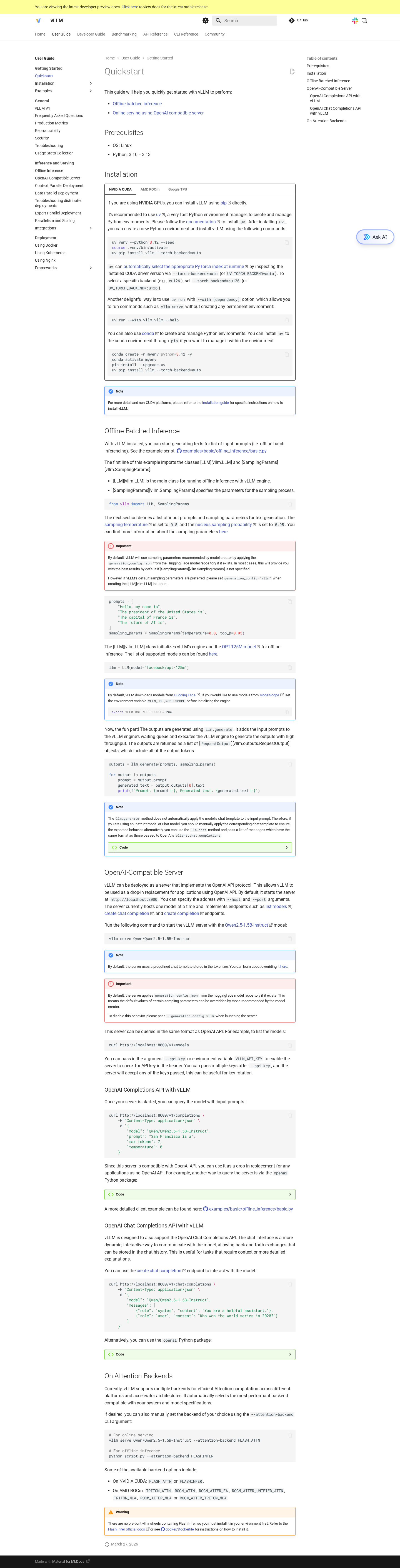
This page covers what you need to install, build, and run vLLM locally. It is a condensed version of the official guide at https://docs.vllm.ai/en/latest/getting_started/.
Prerequisites
- Python: 3.10–3.14 (declared in
pyproject.tomlrequires-python = ">=3.10,<3.15") - Compiler: a C++17 compiler if you build from source
- CUDA: 11.8 / 12.x for the default NVIDIA wheels; vLLM also publishes ROCm wheels for AMD and CPU wheels for x86/ARM
- Hardware: at least one accelerator (NVIDIA GPU, AMD GPU, or supported CPU). vLLM will auto-detect via
vllm/platforms/__init__.py
Install
The recommended path is uv:
curl -LsSf https://astral.sh/uv/install.sh | sh
uv venv --python 3.12
source .venv/bin/activate
uv pip install vllm
pip install vllm also works if you prefer pip. For other accelerators, see the platform-specific docs (the wheels are published as vllm-xpu, vllm-rocm, etc.).
Build from source
For development, you usually want an editable install. Two flavors:
# Python-only changes — uses a precompiled C++/CUDA extension
VLLM_USE_PRECOMPILED=1 uv pip install -e . --torch-backend=auto

# C/C++/CUDA changes — full recompile (much slower)
uv pip install -e . --torch-backend=auto
The build is driven by setup.py (~1,100 lines) which invokes cmake against CMakeLists.txt. The CMake project compiles csrc/ into a _C extension, with optional ROCm (_rocm_C), CPU (_cpu_C), and quantization sub-libraries.
Run a model offline
from vllm import LLM, SamplingParams

llm = LLM(model="Qwen/Qwen3-0.6B")
outputs = llm.generate(
    ["Hello, my name is", "The capital of France is"],
    SamplingParams(temperature=0.8, top_p=0.95),
)
for o in outputs:
    print(o.outputs[0].text)
The LLM class lives in vllm/entrypoints/llm.py. It builds an AsyncLLM (or LLMEngine for legacy paths) from EngineArgs and exposes generate, chat, embed, score, classify, encode, and friends.
Run the OpenAI-compatible server
vllm serve Qwen/Qwen3-0.6BBy default this binds to http://0.0.0.0:8000. Try it:
curl http://localhost:8000/v1/chat/completions \
  -H "Content-Type: application/json" \
  -d '{
    "model": "Qwen/Qwen3-0.6B",
    "messages": [{"role": "user", "content": "Hello"}]
  }'
The server is a FastAPI app (vllm/entrypoints/openai/api_server.py). It implements /v1/chat/completions, /v1/completions, /v1/embeddings, /v1/score, /v1/rerank, /v1/audio/transcriptions, /v1/responses, /v1/realtime, /tokenize, /detokenize, plus Anthropic Messages (/v1/messages via vllm/entrypoints/anthropic/) and SageMaker (vllm/entrypoints/sagemaker/). The vllm bench subcommand drives the same server through the harnesses in vllm/entrypoints/cli/benchmark/.
Common flags
The CLI is documented inline (vllm serve --help); a few of the most-used flags:
| Flag | Effect |
|---|---|
--tensor-parallel-size N |
Shard each layer across N workers (TP) |
--pipeline-parallel-size N |
Stage the model across N pipeline groups |
--data-parallel-size N |
Replicate the engine N times (DP); pair with --api-server-count |
--enable-prefix-caching / --no-enable-prefix-caching |
Toggle prefix cache |
--max-model-len N |
Override the context length |
--gpu-memory-utilization F |
Fraction of GPU memory to use for KV cache + weights |
--quantization NAME |
fp8, awq, gptq, gguf, compressed-tensors, etc. |
--enable-lora |
Enable LoRA serving |
--speculative-config '{...}' |
Configure spec decode (n-gram, EAGLE, draft model, MTP) |
--api-server-count N |
Replicate the FastAPI process for high-fanout |
--enable-elastic-ep |
Enable elastic expert-parallel scaling |
Use --help=all to dump the full surface, or --help=ModelConfig etc. to inspect a single config group.
Run the tests
After installing dev requirements:
uv pip install -r requirements/test/cuda.txt   # x86_64
.venv/bin/python -m pytest tests/v1/engine/test_async_llm.py -v
Tests are parameterized aggressively; a full run requires GPUs and is best done via the Buildkite pipeline (.buildkite/). For local iteration, target a specific file or test ID.
Run the linters
uv pip install -r requirements/lint.txt
pre-commit install
pre-commit run --all-files
Hooks defined in .pre-commit-config.yaml include ruff-check, ruff-format, mypy-3.10, clang-format, markdownlint, typos, actionlint, shellcheck, plus several custom checks (model registry, signoff, codespell, no-system-tests-in-benchmarks, etc.).
For more on the workflow, see How to contribute → development workflow.
Built by Factory AutoWiki from public repository content. It is a generated preview for codebase exploration, not source-maintained documentation.