Automated QA: Testing Your App the Way a Real User Would
By Nizar Alrifai - April 23, 2026 - 2 minute read
Product
Share
End-to-end quality assurance that tests your application with visual evidence posted directly to your PR.
By Nizar Alrifai - April 23, 2026 - 2 minute read
Product
Share
End-to-end quality assurance that tests your application with visual evidence posted directly to your PR.
The tests passed and the linters were green, yet the login form still broke in production because nobody actually clicked through it before shipping.
The Automated QA skill closes that gap. It drives your app the way a real user would: filling forms, typing into terminals, calling endpoints. Then it posts a structured report with visual evidence directly to your PR.
The headline feature is what shows up in your pull request. On every push, Droid runs QA, captures what it saw, and posts a single comment with the results. Reviewers see pass/fail at a glance and can click through to screenshots, terminal snapshots, and API traces without leaving GitHub.
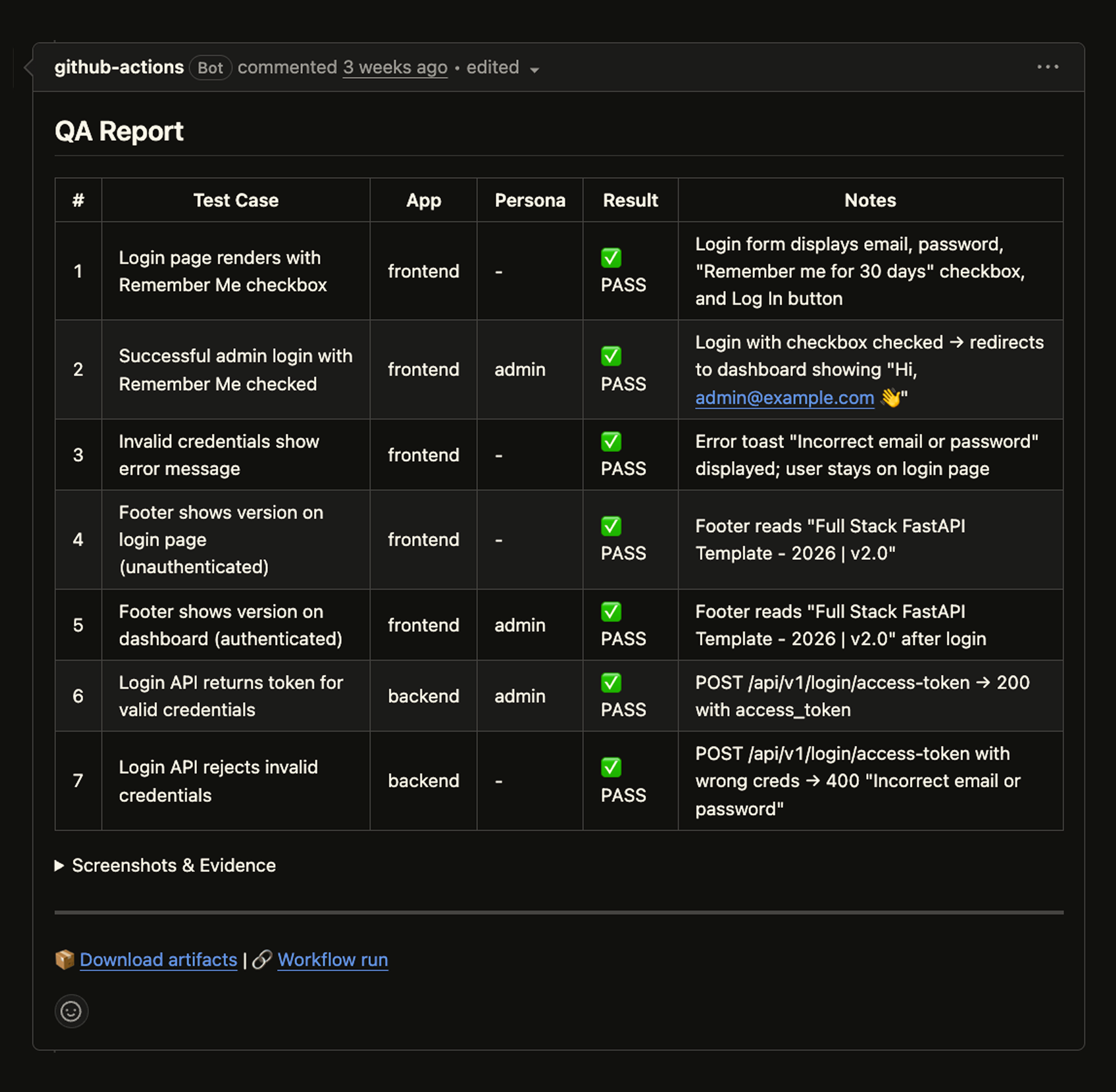
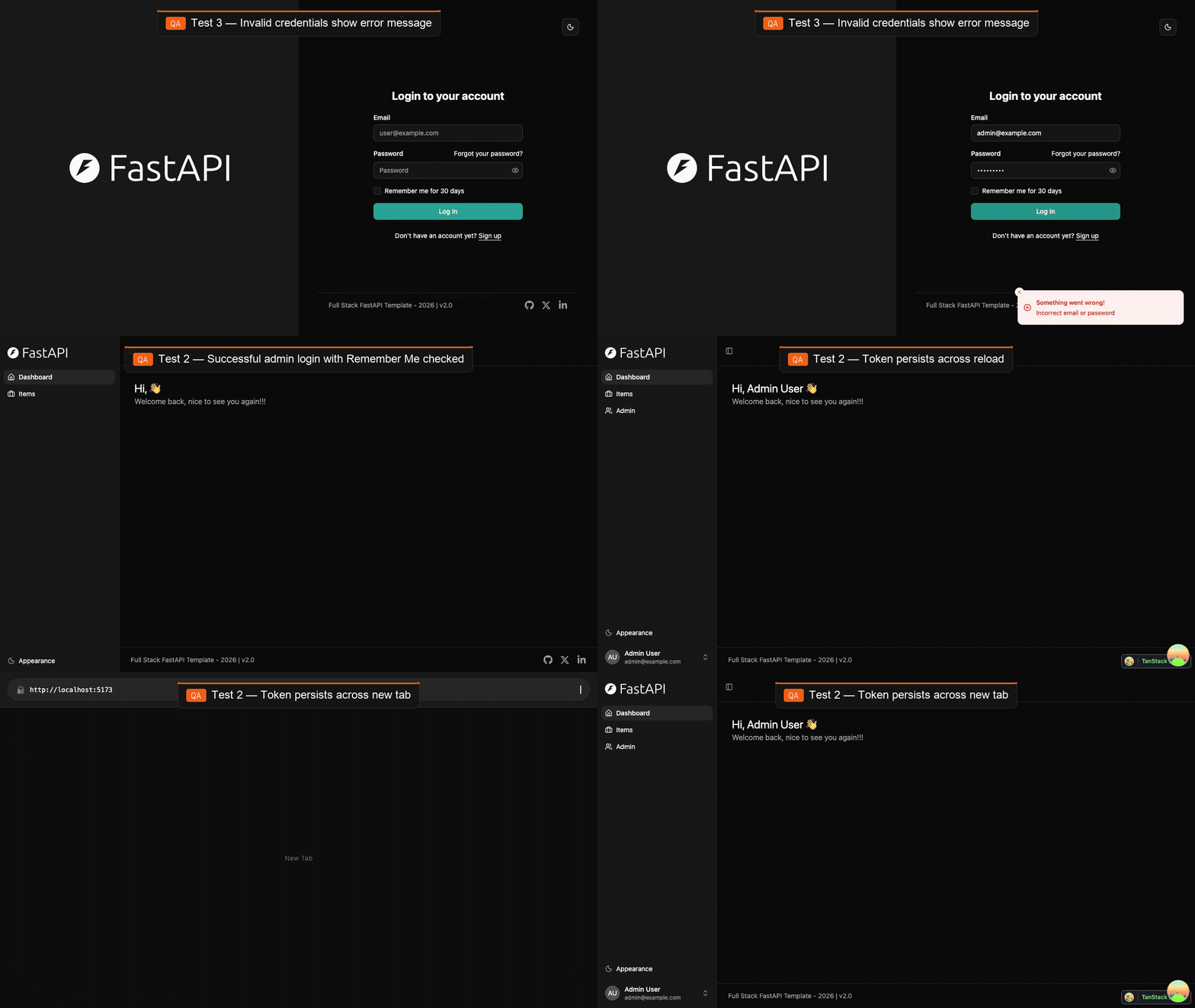
Below is a real example of the QA skill running against the open-source full-stack-fastapi-template — driving the login form, catching the invalid-credentials path, and verifying that the new "Remember Me" option keeps the session across reloads and tab reopen.
Each PR gets exactly one QA comment that updates in place. Pushing a new commit cancels the in-progress run and starts fresh. No duplicate threads, no stale results.
Running full QA on every commit isn't always what you want. The generated workflow can be configured as an optional check: triggered on demand via a PR label, a comment command, or manual dispatch. Teams can keep QA off the critical path for small changes and opt in for the ones that matter, without maintaining a separate pipeline.
QA isn't just a CI artifact. Run /qa in any Droid session to exercise the same flows locally before you push. You get the same structured report and evidence, but against your in-progress branch. It's the fastest way to catch a broken flow without waiting for CI, and it's how most teams iterate on the QA skill itself when they're adding coverage for a new feature.
Run /install-qa in any Droid session. The skill analyzes your codebase, asks about your environments, auth, user roles, and critical flows, then generates a QA skill tailored to your project. After setup, run /qa to test, or let CI handle it on every PR.
droid
> /install-qa
Be detailed during the questionnaire. The more context the setup has, the better the generated tests will be.
Shipping software is a loop: write code, open a PR, get feedback, merge. Automated QA makes the "does it actually work for a user" part of that loop something that happens on every push, in the place you already review code, with evidence you can trust. That's the bar we think testing should meet in an agent-driven world: not more dashboards to check, just a clear answer sitting in your PR when you open it.
Automated QA is available today in all Factory plans. Read the full docs to learn more.
Start building